
Money Train 5 on your smartphone: how to open the slot
Money Train 5 runs in a mobile browser through a licensed operator's site, so a separate file for the slot is usually not needed.
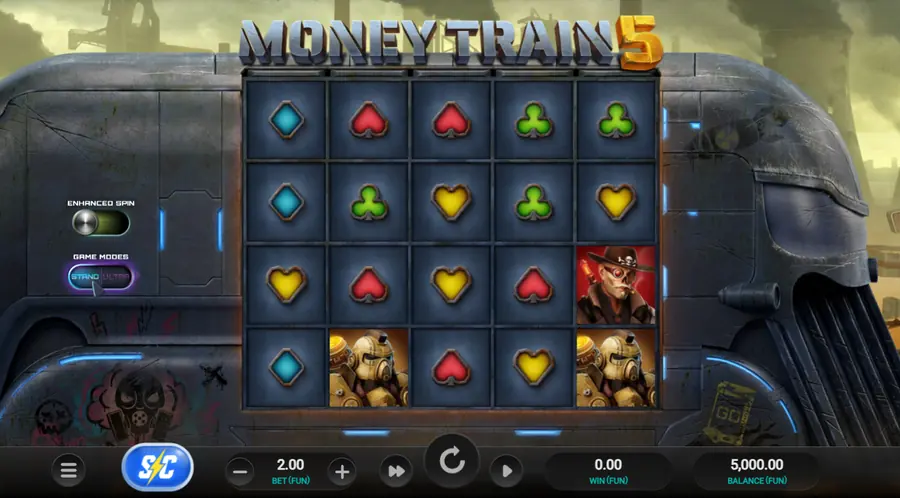
Money Train 5 opens right in your phone's browser, no APK and no installer. On this page: step-by-step launch on Android and iPhone, how to set your bet comfortably on a small screen, and a checklist of what to do if the slot suddenly stops responding.
Do you need to download Money Train 5
Downloading the slot itself is almost never required. Relax Gaming delivers Money Train 5 as an HTML5 game, operators hook it into their casino, and from there it's simple: open the site, find the game in the lobby, hit Spin. The developers never built an installer for the slot itself.
The platform's app is a different story. Many operators offer one for Android and iPhone, installed separately from Google Play, the App Store, or via a link from the casino's own site. That program belongs to the platform, not to Money Train 5 as a standalone product. If an operator works only through its mobile site, there's nothing to install at all.
An APK passed off as "Money Train 5" from third-party sites is a bad idea. Such builds never went through official store review, modified code easily ends up inside them, and on a licensed platform they won't open anyway. If the operator's mobile version offers no installation, stay in the browser.
How to open the game on a smartphone
The launch scenario on Android and iPhone is practically identical, and almost nothing depends on the phone model.
- Check that the operator legally operates in your region and accepts players from your device.
- Open the casino site or its app in an up-to-date version of Chrome, Safari, or another supported browser.
- Log into your account, or choose demo mode if the slot offers it.
- Find Money Train 5 in the lobby. Searching by provider Relax Gaming is usually the fastest way.
- Check the bet size before starting the spin and press Spin.
The feature set differs between operators. Some disable the bonus buy, some lower the maximum bet, some lock demo mode behind registration. Before playing, it's worth checking the help section of the specific platform so nothing surprises you later.
Launching on Android and iPhone
On Android the slot opens through Chrome or another current mobile browser. If the operator publishes an app on Google Play, install it from there, but only from the official store or via a link from the casino's own site.
On iPhone things work much the same: the game launches in Safari or in the operator's app from the App Store. If the app isn't available for your region, the mobile version of the site remains the main option.
Nobody can guarantee compatibility with every model and OS version. Very old devices or outdated browsers can freeze, crash the tab, or show a stripped-down interface. That's a matter of the specific combination of operator, device, and browser, not a property of the slot itself.
Demo without installation
Demo mode is the fastest way to see how Money Train 5 behaves on your particular phone. No deposit needed, and the results show immediately: whether the device handles the smooth animation of the bonus round, whether the buttons are easy to hit with a finger, whether the case heats up after five minutes.
What you can usually do in the demo before playing for money:
- gauge loading speed and interface responsiveness on a real connection;
- check the betting range and see which Buy Feature options the operator offers;
- look over the 5×4 grid and the spin indicators in both landscape and portrait orientation.
The demo often works without registration too, but some platforms hide it behind a login. If the operator requires an account, it's easier to create a test profile and hold off on entering payment details until you're sure the platform suits you. The free version for testing on a phone is covered in more detail on a separate page.
The game board on a small screen
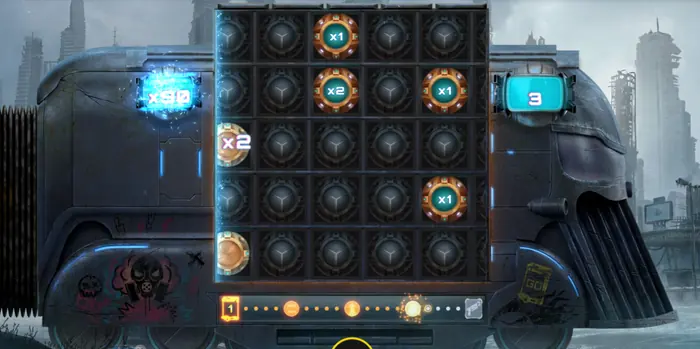
On a phone, the 5×4 board takes up most of the screen, and the service elements move down to the bottom edge. On the left there's usually an indicator for the active bonus or multiplier; on the right, a counter of the spins remaining in the round. Below the grid sit the bet adjustment buttons, Spin, Autoplay, and Quick Spin. This layout is typical for the mobile version of Money Train 5 and matches what you can see in the screenshot above.
Before your first spin, it's worth walking through the bottom panel and finding where the bet changes and where autoplay starts. In portrait orientation the buttons are sometimes smaller than you'd like, and accidental taps happen. If that gets in the way, try landscape mode, or fullscreen if your browser supports it.
Check the bet size before the spin starts, specifically. Once you press Spin, the bet is locked in for that round and can't be changed: the rule works the same in the base game, in Enhanced Spin, and when buying the bonus.
Screen rotation and zoom
Landscape orientation often makes the grid larger and frees up space for the buttons. On some phones this automatically triggers fullscreen mode, and the browser's address bar slides away. That behavior comes from the specific browser, not from the game itself.
Fullscreen mode is only worth trying where the casino site supports it. If the buttons overlap after rotation or slide out of the visible area, go back to portrait and check the zoom settings in your browser. Every operator lays out its mobile version differently, so there's no universal recipe here.
Touch controls
Every key action in Money Train 5 is built around taps: Spin, bet adjustment, Autoplay, Quick Spin, Buy Feature. The buttons respond to a normal finger tap, no long press needed. An accidental second tap on Spin during the animation usually won't start a second round, because the button locks until the spin finishes.
In portrait mode, avoid swiping while the reels are spinning. Page-scrolling gestures can scroll the browser window and shift the interface. If this keeps happening, it's easier to lock the screen orientation in your phone's system settings or open the casino in fullscreen mode.
Browser and connection requirements
The minimum set of conditions under which Money Train 5 usually launches without problems:
| Parameter | What to check |
|---|---|
| Browser | A current version of Chrome on Android or Safari on iPhone; outdated builds may not fully support the HTML5 game |
| Connection | Stable Wi-Fi or mobile internet without heavy packet loss |
| JavaScript and cookies | Must be enabled, otherwise the casino lobby won't serve the game |
| Free memory | A few hundred megabytes of headroom so other apps don't unload the tab during the bonus |
| Permissions | Access to gaming content in your region, agreement with the casino's rules, age restrictions |
For the specific minimum versions of Android or iOS, check with the operator: they depend on which build of the site your device receives and can change without separate notice.
Troubleshooting on a phone
Common situations and what to do about them before contacting support:
- The game won't load or freezes on the start screen. Refresh the tab, check your connection, close other apps, free up RAM. If that doesn't help, try a different supported browser.
- Buttons overlap or run off the edge of the screen. Change the orientation, disable hardware scaling in the browser, and check whether the system's "one-handed mode" is on.
- The phone gets very hot and drains fast. The bonus round with respins puts a load on the device; lower the brightness, turn off background downloads, and don't leave the game running in the background during autospins.
- After an iOS or Android update, the game stopped launching. Clear the browser cache and the casino app's data, and reinstall it from the official store if necessary.
If none of this helped, contact the operator's support. They have the log of your specific session and can tell whether the problem was on their side. Downloading third-party "patches" or modified clients on the pretext of fixing things isn't worth it: it voids any security guarantees.
Safety and playing on mobile
Before entering card details or launching Buy Feature, check three basic things: the casino site's domain, the presence of a license in the footer or the "About us" section, and the age threshold in your jurisdiction. At the slightest doubt, it's better not to open an account and not to deposit.
On someone else's device, don't save passwords and payment details, don't enable autofill and biometrics for casino logins. After a gaming session, it's useful to log out of your account and clear cookies, especially if the phone isn't yours.
A high-volatility slot calls first and foremost for bankroll management. Most operators include deposit limits, session timers, and self-exclusion in their mobile versions; it's better to switch these on before your balance starts slipping. There's a separate page covering choosing your bet responsibly in more depth.
Other Money Train 5 pages
If you want to dig deeper into the mechanics, bonus stations, Buy Feature, Nuclear Wild, and the order in which special symbols trigger after launching on your phone, take a look at the slot review and its features. It also collects the exact multiplier values and the conditions under which the bonus round cuts off at 50 000x.
FAQ
Do I need to download a separate Money Train 5 file to my phone?
In most cases, no. The slot opens in the browser through a licensed operator's site. The only thing you might install separately is the casino's own app from Google Play, the App Store, or a link from its site.
Where can I safely get Money Train 5 for Android and iPhone?
Only from an operator's site with a valid license, or from its official app on Google Play and the App Store. Don't install APKs or builds from unfamiliar sources: modified code easily ends up inside them, and on a licensed platform they won't open anyway.
Can I test the game in demo mode on my phone first?
Yes, if the operator offers demo mode. It's the quickest way to see how smoothly the animation runs, whether the phone heats up, and how easy the buttons are to hit, without topping up your balance.
What should I do if the game freezes or won't load on my smartphone?
Refresh the tab, check your connection, close unneeded apps, and try a different supported browser. If that doesn't help, contact the operator's support: they have the log of your specific session and can tell whether the problem was on their side.